“I sent the new drawing, why did you make the old part?” We explain the physics of mold modification (Steel Safe vs. Steel Unsafe), how to handle Work-In-Progress (WIP) during an ECO, and Sureton’s strict revision control protocols.
Here is the scenario that makes Project Managers wake up in a cold sweat:
It’s Tuesday. You realize the mounting hole on your housing is 0.5mm too small.
You quickly update the CAD model to Rev B.
You email the new drawing to your supplier in China. Subject: “URGENT: Please use this new drawing!”
The supplier replies: “Received.”
Three weeks later, the shipment arrives. You open the box.
It’s Rev A. The hole is still too small.
You scream. The supplier says, “Sorry, the production manager didn’t see the email in time.”
At Sureton, we know that in hardware development, Change is Inevitable.
But change without process is chaos.
Managing an Engineering change order management (ECO) isn’t just about sending a new file; it’s about managing Physics, Inventory, and Information.
Here is how we handle revisions so you never receive the “wrong version” again.
1. The Physics of Modification: “Steel Safe” vs. “Steel Unsafe“
Before you hit “Save” on that CAD change, you need to ask: “Is this change Steel Safe?”
In Die Casting and Injection Molding, we are cutting a negative shape into a block of hard steel.
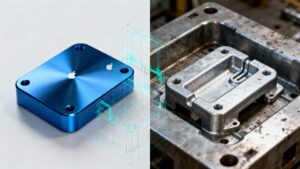
Steel Safe (Easy): You want to add material to your part (e.g., make a wall thicker, make a boss taller, make a hole smaller).
Why it’s easy: We just cut away more steel from the mold. This is cheap and fast.
Steel Unsafe (Hard): You want to remove material from your part (e.g., make a wall thinner, move a hole location).
Why it’s hard: This requires adding material to the mold cavity, typically through welding and subsequent re-machining. This process introduces heat-affected zones, posing a long-term risk to mold life and part consistency if not executed flawlessly.
Cost: This is expensive and takes days or weeks.
Sureton’s Advice: When designing Rev A, always leave yourself “Steel Safe” margin. If you aren’t sure about a hole size, make it smaller (Steel Safe). We can always drill it out later. We can’t put metal back.
2. The “WIP” Flush: What About the Parts on the Line?
When you issue an ECO, production doesn’t just magically reset. There is Work-In-Progress (WIP).
You might have:
500 parts already cast but not machined.
200 parts machined but not painted.
1,000 parts finished and sitting in the warehouse.
The Decision Matrix:
You must give us a clear instruction for the WIP. Do not leave it ambiguous.
Scrap: “Destroy all Rev A parts immediately.” (Most expensive).
Rework: “CNC machine the old parts to match Rev B.” (Possible if the change is subtractive).
Use-As-Is: “Finish the current batch of Rev A, and start Rev B on the next order.” (Running change).
Sureton’s Protocol: Upon ECO receipt, we immediately freeze production and perform a full WIP audit. Within 4 business hours, you receive a report not just counting inventory, but providing a recommended disposition plan.
This proactive approach turns inventory liability into a managed, collaborative decision.
3. The “Single Source of Truth”: Killing the Email Chain
Email is where ECOs go to die.
If you send a drawing to a salesperson, who forwards it to a project manager, who prints it for a line leader… someone will eventually use the wrong piece of paper.
The Sureton System:
We use a centralized ERP System for Manufacturing revision control.
Lockout: When you issue Rev B, our system automatically locks the BOM (Bill of Materials) for Rev A. The system will physically refuse to generate a “Production Traveler” ticket for the old version.
Physical Purge: Our Quality Team goes to the shop floor and physically removes/destroys all paper copies of Drawing Rev A.
Digital Push: The CNC machines pull the program directly from the server. If the file name doesn’t match the current active revision, the machine won’t start.
4. The Cost of Change: Transparency
“Why does moving this hole cost $500?”
An ECO is not just a file change. It triggers a chain reaction of costs:
- Tooling Modification: Welding, stress-relief, re-machining, and polishing of the mold cavity.
- Fixturing & Programming: Re-designing CNC jigs and re-programming tool paths.
- Quality Documentation: Re-creating the First Article Inspection (FAI) report, updating the Control Plan, and re-programming CMM inspections.
Our Promise: We will never surprise you. We provide a formal ECO Impact Assessment (Cost + Lead Time) for your approval before we cut any steel.
5. How to Issue an ECO Like a Pro
To ensure 100% success, follow this format when sending a change to Sureton:
The Document: A formal ECO cover sheet (PDF) authorizing the change.
Specification: Redlined drawings (PDF) and updated 3D STEP files. We machine from the 3D model.
Clarity: A “Was/Is” table clearly listing every changed dimension.
Instruction: Unambiguous effective date (“Immediate” or “At next production order PO#XXX”).
Embrace Iteration, Control the Process
Hardware development is an iterative process. We expect your design to change.
The difference between a disaster and a smooth transition is Communication Protocol.
Need to update a design?
Don’t just hope for the best. Contact Sureton engineering team, We’ll guide you through a structured ECO workflow—from impact assessment to system-wide implementation—ensuring your revision is executed flawlessly, on time, and within budget.